Linking a COFY cloud
✓ EnergyID for Business ★ PreviewWith COFY services, you can connect your COFY Cloud to your Workspace so that extra data and modules become available in EnergyID. Examples include modules for Signals, Members, Production or Tariffs.
What is a COFY Cloud?
A COFY Cloud is a separate environment where your organization can manage its own data, integrations and logic and make them available to EnergyID. Read this article to learn more about what a COFY Cloud is and how to get started with it.
What are COFY services?
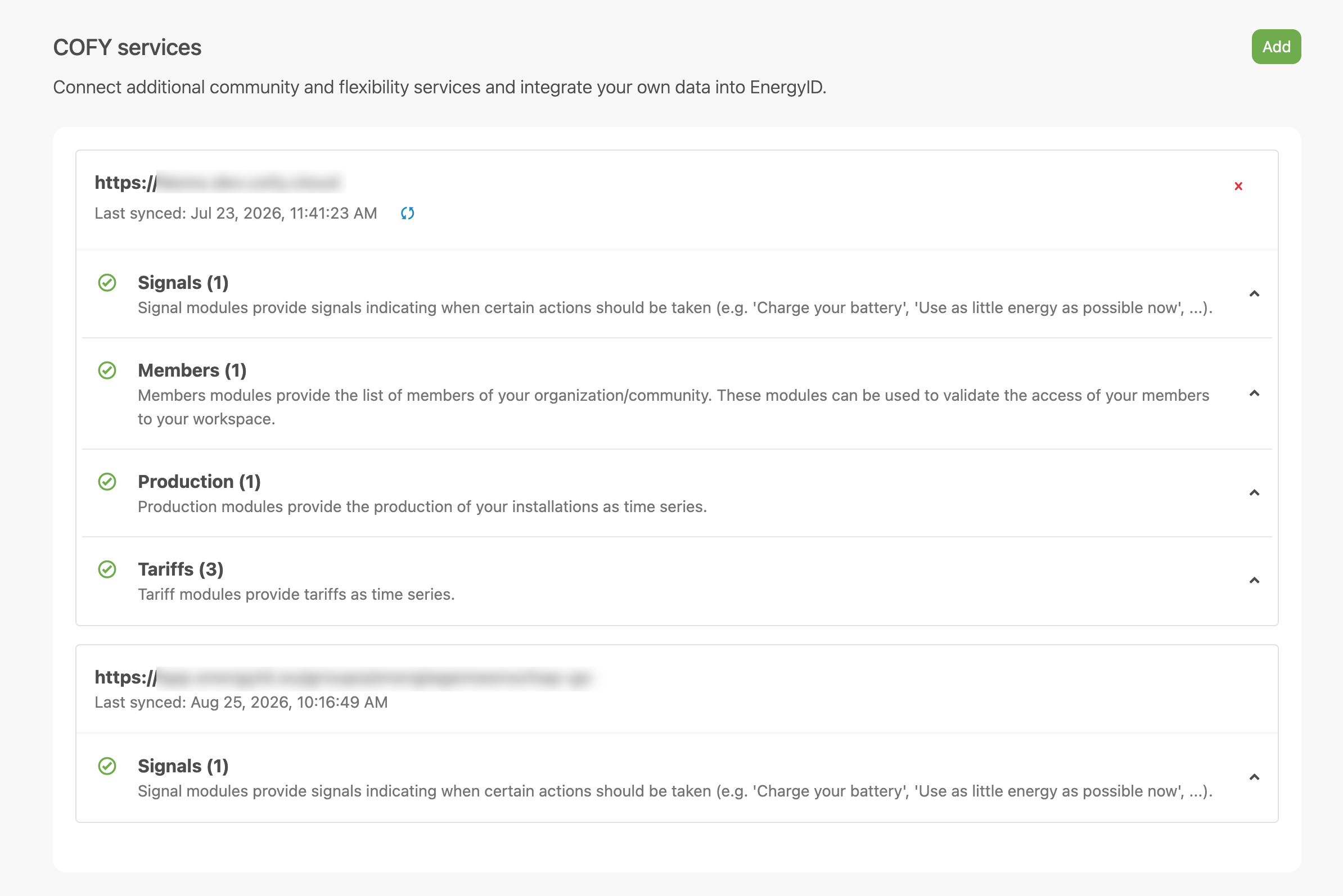
A COFY service is a Workspace-level connection to a COFY Cloud based on a discovery URL and an authentication token. As soon as you add a valid connection, EnergyID retrieves the available modules from that service.
For each connected service, you can see:
- the base URL of the service;
- the time of the last synchronization;
- the available modules, grouped by type.
Before you start
- Go to your Workspace settings.
- Open the COFY services section.
- Make sure you have the discovery URL of your COFY service ready, along with the authentication token: know whether this token should be sent as a query parameter or as an HTTP header, and under what name.
Only Workspace administrators can add, synchronize or remove COFY services. Other Workspace users can view this information, but cannot manage it.
Add a COFY service
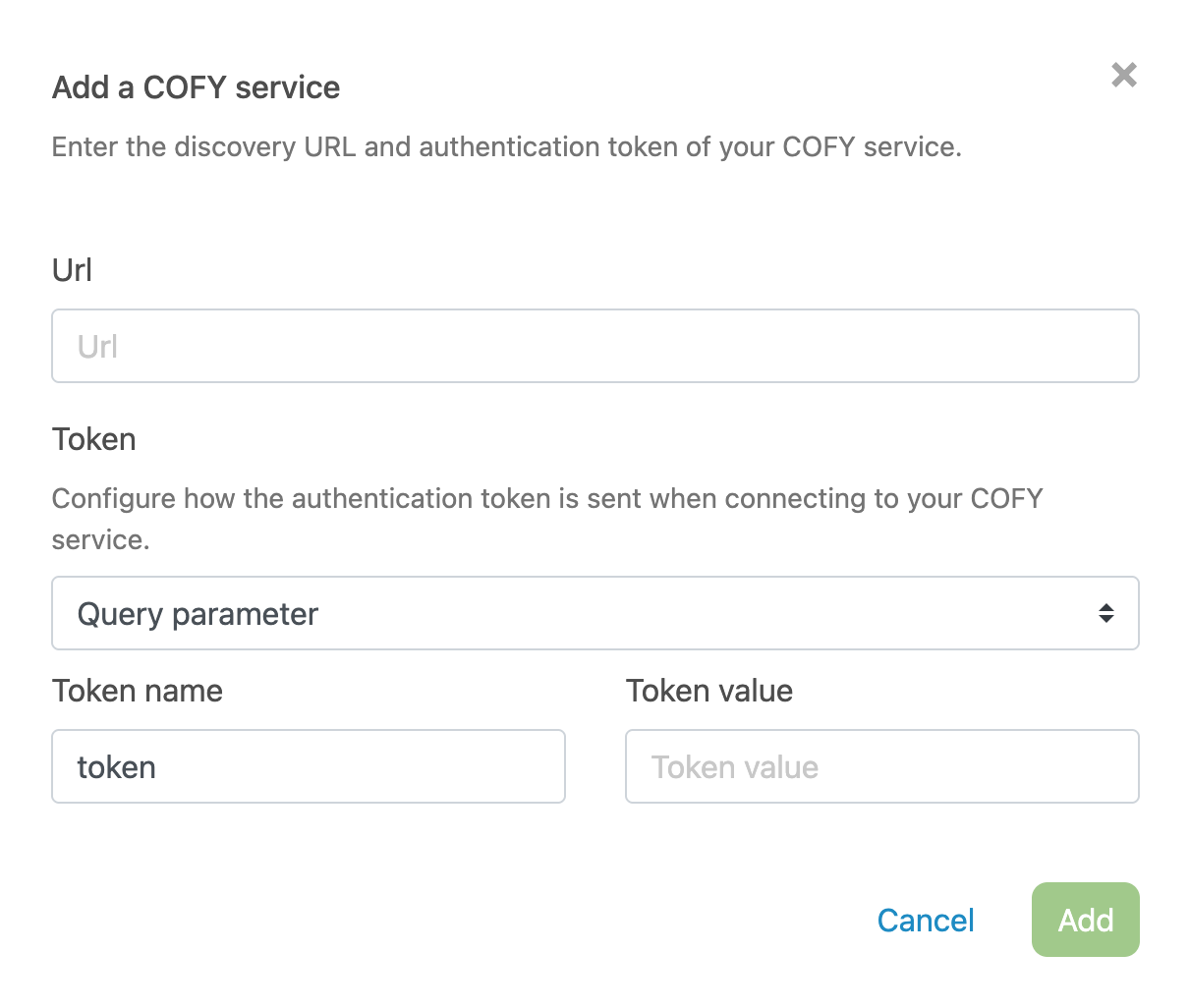
- In COFY services, click Add a COFY service.
- Enter the Url of your COFY service.
- Under Token, specify how the token should be sent: as a Query parameter or as an HTTP header.
- Enter the Token name (the key or header name under which the token is sent) and the matching Token value.
- Click the button with the plus icon to save the connection.
If the details are valid, the service appears in the list immediately and the available modules are retrieved.
Note: You cannot add a second COFY service with the same base URL and token.
View available modules
For each connected COFY service, you can see which modules are available. You can expand each module type to view details such as name, description and version.
If no modules are found, you will see a message saying that no modules were detected for that connection.
Synchronize a COFY service
Synchronizing retrieves the latest metadata and module information from your COFY service again.
- Find the correct service in the list.
- Click the synchronization icon next to Last synchronized.
After a successful synchronization, the service entry in the list is updated.
Remove a COFY service
- Click the remove icon next to the service.
- In the confirmation window, check whether the service is still being used by other functions.
- Confirm that you want to remove the connection.
Note: If a COFY service is still used in one or more functions of your Workspace, you cannot remove it yet. Update the settings of those functions first.
Note: After removal, the data from that COFY service will no longer be available in this Workspace.
Use COFY services in other functions
Depending on which functions are enabled in your Workspace, you can use connected COFY modules in functions such as Energy Planner, External records and Shared time series. In each function, you select the correct COFY module for the intended purpose.
FAQ
Why can’t I remove a COFY service?
That service is still being used in at least one function of your Workspace. Open the settings of that function first, update the configuration and then try again.
Why don’t I see any modules after connecting?
EnergyID already tries to retrieve the modules when you add the service. If the list stays empty, check whether your discovery URL, token name, and token value are correct, whether the token is sent using the right option (query parameter or HTTP header), and whether your COFY service actually provides modules. If something has changed in your COFY service in the meantime, you can also synchronize it manually afterwards.
I don’t have a COFY Cloud yet. What now?
You can set up a COFY Cloud yourself or have it set up for you. If you want to discuss which approach best fits your organization, or if you are interested in hosting and setup by EnergyID, contact sales@energieid.be.